Introduction
Business documents can contain financial records, contracts, employee information, customer data and intellectual property. A security failure involving these documents can create financial, operational and regulatory consequences. IBM's 2025 Cost of a Data Breach Report puts the global average cost of a data breach at $4.44 million.
For organizations evaluating a document management system, the question is therefore not simply whether documents are stored securely. Buyers need to understand how access is controlled, activities are monitored, data is protected and documents can be recovered when something goes wrong.
What Should Businesses Evaluate in DMS Security?
A secure DMS should protect documents throughout their lifecycle. Instead of evaluating security as one feature, buyers should assess several control areas:
The right combination depends on the organization's document sensitivity, regulatory obligations and operational requirements.
Why DMS Security Requires More Than Password Protection
Passwords alone do not determine whether a document repository is secure. Verizon's 2025 DBIR analyzed more than 22,000 security incidents and 12,000 confirmed breaches, with human involvement present in around 60% of breaches.
This makes access governance particularly important. A DMS should limit what users can access and provide visibility into activities involving sensitive documents.
Role-Based Access Control
Role-based access control (RBAC) allows organizations to assign document permissions according to responsibilities.
For example, an HR manager may need access to employee records while a finance employee does not. NIST recommends least-privilege access, meaning users should receive only the access necessary to perform their assigned tasks.
What Buyers Should Check
Ask whether the DMS allows administrators to:
Document-Level Permissions
Folder-level access may not always provide sufficient control. Sensitive contracts, financial records, employee files and confidential reports may require different permissions even when they exist within the same repository.
When evaluating a DMS, determine whether permissions can be applied at the appropriate level and whether users can be restricted from activities such as editing, downloading, sharing or deleting documents.
Authentication and Multi-Factor Authentication
Strong authentication provides another layer of protection against compromised credentials. Businesses should check whether the DMS supports enterprise authentication methods and multi-factor authentication. They should also examine how administrator accounts are protected because privileged users can have significantly greater control over documents and security settings.NIST recommends restricting privileged accounts and limiting privileged functions to authorized users.
Encryption for Documents and Data
Encryption helps protect information from unauthorized access while data is stored or transmitted.
When evaluating a DMS, ask:
Encryption should be assessed alongside access controls rather than treated as a standalone security measure.
Audit Trails and Activity Tracking
A secure DMS should provide visibility into important document activity.
Audit trails can record activities such as:
NIST recommends protecting audit information against unauthorized access, modification and deletion. For buyers, the important question is not simply "Does the DMS have audit trails?" but "What exactly is recorded and can the organization retrieve and review those records?"
Version Control and Document Integrity
Version control contributes to document security by maintaining a history of changes.
Businesses should evaluate whether the DMS can identify:
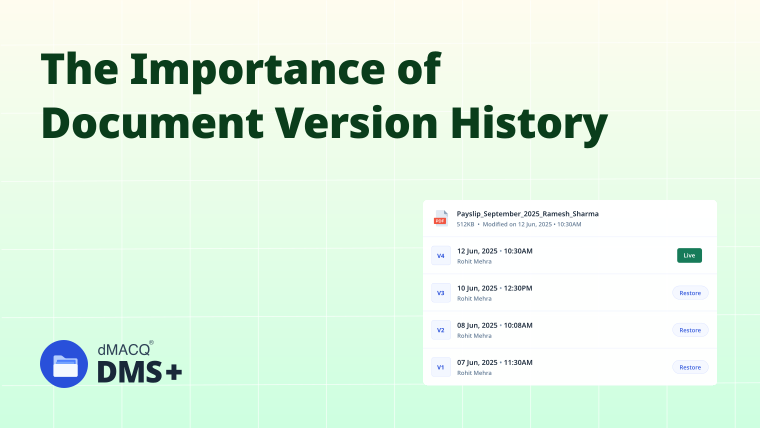
This is particularly important for contracts, policies, controlled records and documents used during audits. Your existing article on document version history can provide deeper information on this specific capability.
Secure Document Sharing
External sharing can introduce risks even when the internal repository is well protected. A DMS should provide controls over how documents are shared with customers, vendors, auditors or other external stakeholders.
Depending on the organization's requirements, buyers should evaluate:
dMACQ's existing Secure Cross-Organization Collaboration with DMS+ article can support this topic with a more collaboration-focused perspective.
Backup and Disaster Recovery
Document security also includes protecting information against loss and operational disruption. CISA recommends maintaining offline, encrypted backups of critical data and regularly testing their availability and integrity for disaster recovery.
When evaluating a DMS, buyers should ask about:
A system that prevents unauthorized access but cannot reliably restore critical documents after an incident is incomplete from a business-continuity perspective.
Administrative and Privileged Access
Administrators can make changes affecting large numbers of users, documents and security settings.
Businesses should therefore evaluate whether privileged access is:
NIST specifically recommends restricting privileged accounts and logging privileged functions.
Security Monitoring and Alerts
Security controls become more useful when organizations can identify unusual activity.
Depending on the DMS, monitoring capabilities may include:
During a vendor evaluation, ask what events can generate alerts and whether security logs can integrate with the organization's wider monitoring environment.
Data Residency and Hosting Controls
Where documents and backups are hosted may matter for regulatory, contractual and organizational requirements.
Businesses should understand:
This becomes particularly relevant for organizations operating across multiple jurisdictions or handling regulated information.
Security Certifications and Independent Assessments
Security certifications can provide useful evidence about a vendor's security practices, but they should not be the only evaluation criterion.
Ask vendors:
The objective is to understand the actual security controls behind the certification.
DMS Security Evaluation Checklist
Before selecting a DMS, businesses should verify whether the platform provides the security controls required for their documents, users and regulatory environment.
Access Control
Authentication
Encryption
Auditability
Document Integrity
Secure Document Sharing
Backup and Recovery
Monitoring and Administration
Hosting and Vendor Security
Questions to Ask a DMS Vendor About Security
Before making a purchase decision, ask vendors:
This turns a general security discussion into a practical vendor evaluation framework.
How DMS+ Supports Document Security
DMS+ provides security and document-management capabilities that can support organizations in controlling access to business documents, tracking document activity and maintaining document history.
The current dMACQ platform describes capabilities including end-to-end encryption, role-based access controls, immutable audit trails, field-level masking and redaction and India data residency. These capabilities should be evaluated alongside an organization's specific security requirements rather than treated as a substitute for its broader security program.
Real-World Examples
HR Documents
An HR department may restrict employee records to authorized HR personnel while maintaining activity logs and document histories.
Legal Documents
A legal team may require granular permissions, version control and controlled external sharing when working with contracts or litigation documents.
Financial Documents
Finance teams may require encrypted storage, restricted access, audit trails and controlled sharing for financial statements, tax records and sensitive reports. dMACQ already covers this use case in its Secure Financial Data Room content, which discusses RBAC, encryption, audit trails, monitoring and secure sharing.
How to Evaluate DMS Security Before Buying
Do not evaluate security based on a single feature or certification.Start by identifying the organization's sensitive document types, user groups, regulatory requirements and major security risks. Then convert those requirements into a checklist and ask shortlisted vendors to demonstrate the relevant controls. A vendor demonstration should show how security works in practice, not simply confirm that a feature exists.
Common Mistakes When Evaluating DMS Security
Organizations can overlook important security issues when they focus only on basic access controls or certification logos.
Common mistakes include:
Security evaluation should therefore consider people, processes and technology together.
FAQs
What is DMS security?
DMS security refers to the controls used to protect documents from unauthorized access, modification, disclosure, loss and misuse throughout their lifecycle.
Why is document security important for businesses?
Business documents can contain confidential financial, legal, employee and customer information. Strong DMS security helps organizations control access, maintain document integrity and reduce the risk of unauthorized disclosure or data loss.
What role does encryption play in DMS security?
Encryption protects document data while it is stored and transmitted. Businesses should evaluate both encryption at rest and encryption in transit when assessing a DMS.
How does a DMS prevent unauthorized access?
A DMS can use controls such as role-based access, granular permissions, multi-factor authentication and privileged-access controls to restrict documents to authorized users.
Can a DMS support audit and compliance requirements?
A DMS can support audit and compliance processes by maintaining document histories, access records, audit trails and controlled permissions. The specific requirements supported depend on the organization's regulations and implementation.
Conclusion
DMS security is not defined by a single feature. Access controls, authentication, encryption, audit trails, version management, secure sharing, backup protection and administrative controls work together to protect business documents throughout their lifecycle.
For organizations evaluating DMS platforms, the strongest approach is to translate security requirements into a practical vendor checklist and verify those capabilities through demonstrations, documentation and due diligence. This helps buyers select a system that matches their document sensitivity, operational needs and security requirements.